sky999
天山茗客
UID 181291
Digest
2
Points 10
Posts 3907
码币MB 2615 Code
黄金 0 Catty
钻石 884 Pellet
Permissions 10
Register 2020-11-28
Status offline
|
关于tyc.py程序的评测。
这个程序,作者是否有运行说明书?比如说明运行这个程序所需要的环境设置是如何的?
关于这个程序的源代码与架构三个组成部分。
1、tyc.py ---PYTHON程序源代码
2、README.MD -- 作用不明
3、requirements.txt -- 采集txt文件
其中python的源代码如下:
from selenium.webdriver.chrome.service import Service from selenium import webdriver from selenium.webdriver.common.by import By import random from time import sleep class Web_Browser(object): def __init__(self, search_name): option = webdriver.ChromeOptions() server = Service(executable_path='E:\Python38') self.driver = webdriver.Chrome(service=server, options=option) self.search_name = search_name self.first_item_in_search_list_xpath = ['//*[@id="page-container"]/div/div[2]/section/main/div[2]/div[2]/div/div/div[3]/div[2]/div[1]/div[1]/a',\ '//*[@id="page-container"]/div/div[2]/section/main/div[2]/div[2]/div/div/div[2]/div[2]/div[1]/div[1]/a',\ '//*[@id="page-container"]/div/div[2]/section/main/div[3]/div[2]/div[1]/div/div[2]/div[2]/div[1]/div[1]/a',\ '//*[@id="page-container"]/div/div[2]/section/main/div[3]/div[2]/div[1]/div/div[3]/div[2]/div[1]/div[1]/a'] self.search_xpath = '//*[@id="page-container"]/div[1]/div/div[3]/div[2]/div[1]/div[1]/input' self.search_button_xpath = '//*[@id="page-container"]/div[1]/div/div[3]/div[2]/div[1]/button' self.search_click_button_xpath = '//*[@id="page-header"]/div/div[2]/div/div/button' self.driver.get('https://www.tianyancha.com/') self.email_xpath = '//*[@id="page-root"]/div[3]/div/div[1]/div[1]/div[3]/div[1]/div[4]/div[2]/div[2]/span[2]' self.legal_person_xpath = '//*[@id="page-root"]/div[3]/div/div[3]/div/div[2]/div[2]/div/div[2]/div/div[2]/table/tbody/tr[1]/td[2]/div/div[1]/div/div[2]/div/div[1]/a' self.name_xpath = '//*[@id="page-root"]/div[3]/div/div[1]/div[1]/div[3]/div[1]/div[1]/div[1]/h1' self.address_xpath = '//*[@id="page-root"]/div[3]/div/div[3]/div/div[2]/div[2]/div/div[2]/div/div[2]/table/tbody/tr[10]/td[2]/div/span[1]' self.legal_person_xpath = '//*[@id="page-root"]/div[3]/div/div[3]/div/div[2]/div[2]/div/div[2]/div/div[2]/table/tbody/tr[1]/td[2]/div/div[1]/div/div[2]/div/div[1]/a' self.phone_number_xpath = '//*[@id="page-root"]/div[3]/div/div[1]/div[1]/div[3]/div[1]/div[4]/div[2]/div[1]/span[2]' sleep(3) def search(self,keyword): #向搜索框注入文字 self.driver.find_element(By.XPATH, self.search_xpath).send_keys(keyword) #单击搜索按钮 srh_btn = self.driver.find_element(By.XPATH, self.search_button_xpath) srh_btn.click() def get_deeper(self): j = 0 while True: try: inner = self.driver.find_element(By.XPATH,self.first_item_in_search_list_xpath[j]).get_attribute("href") break except: j += 1 if j > len(self.first_item_in_search_list_xpath): raise Exception('搜索列表第一企业名称的xpath路径未包含在列表中') continue self.driver.get(inner) sleep(1) def fetch_data(self): return_dic = {} sleep(1) try: name = self.driver.find_element(By.XPATH, self.name_xpath).text except: name = '没有找到企业名称' return_dic['企业名称'] = name try: legal_person = self.driver.find_element(By.XPATH, self.legal_person_xpath).text except: legal_person = '没有找到企业法人' return_dic['法人'] = legal_person try: phone_number = self.driver.find_element(By.XPATH, self.phone_number_xpath).text except: phone_number = '没有找到电话号码' return_dic['电话号码'] = phone_number try: legal_person = self.driver.find_element(By.XPATH, self.email_xpath).text except: legal_person = '没有找到邮箱' return_dic['邮箱'] = legal_person try: address = self.driver.find_element(By.XPATH, self.address_xpath).text except: address = '没有找到企业地址' return_dic['企业地址'] = address return return_dic if __name__ == "__main__": print("请输入公司名称") #search_name = input() search_name = "广东莱德斯科技有限公司" print("正在搜索%s公司的信息, 请稍等!" % search_name) d = Web_Browser(search_name="广东莱德斯科技有限公司") d.search(search_name) sleep(random.randint(1, 3)) d.get_deeper() info = d.fetch_data() print(info) d.driver.quit() 看起来,是运用了自动化工具 selenium 通过chrome,识别Xpath进行网页数据采集。
但这个程序,在我的环境中,无法运行,报错。如webdriver错误、selenium错误。我无法运行此程序进行数据采集。
看了相关的资料,也更改了作者的源代码,但我仍然是无法跑动这个程序。 这个程序看起来像是在linux上运行的。 其中有一条路径是USR开头,初步的判断是在Linux上跑的。当然python可以跨平台运行。只是目前我认为这段代码更像是在网上copy下来的。
----------------------------------------------
以上是我的评测结果。
我提个要求把,我认为python虫师这个岗位应该要开发一种能在apache上运行的python程序,且不需要借助自动化运行工具来进行数据采集的python程序。
这样就能方便集成到我们的服务器上,同时也降低对环境的要求。
selenium的采集程序,需要1、python环境。2、selenium库。3、selenium的webdrivier。4、chrom或者firefox、IE浏览器,不同的浏览器要对应不同的webdriver库。版本要一致。 这样对于我们保持selenium的环境很高要求。
除非作者把这些环境都能集成在一包上,不然我们要配置这样的环境,其实是很费力气与时间的。
所以得到的结果是,我们应该选择apache跑python的方向与实践路径,降低我们对环境的依赖,同时也可以对用户输出这套爬虫程序,而不需要用户自己搭建一个python采集程序环境。
除非作者能做到一键集成整个应用环境。
-------------------------------------------------------------
如果要进行下一个岗位面试,我认为应该要写清楚,在apache上跑爬虫(采集XXXX企业查询的程序),硬性要求是在apache上跑的python。
[ 本帖最后由 sky999 于 2022-11-3 13:45 编辑 ]
 Image attachment:
Screenshot_1.png (2022-11-3 13:44, 72.37 K) Image attachment:
Screenshot_1.png (2022-11-3 13:44, 72.37 K)
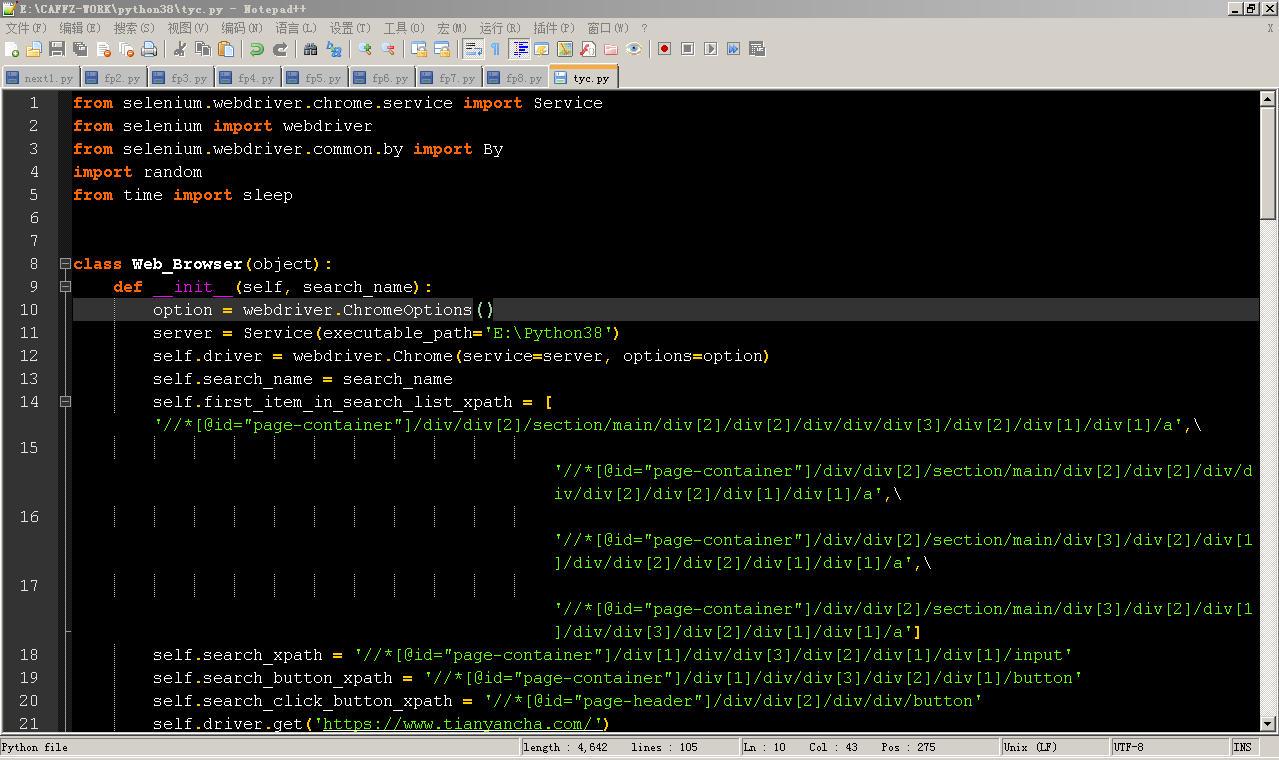
Image attachment:
Screenshot_2.png (2022-11-3 13:45, 58.81 K)

|
|